Turn your artwork into an Etsy-ready printable listing.
Create and refine artwork, prepare print files in multiple sizes, and write your listing copy. Review everything in Inkla Studio, then export your files and upload them to Etsy.
For Mac with Apple silicon and Windows x64. Requires your own compatible ChatGPT account; AI access and usage are separate.
A silent walkthrough with example campaign artwork in Inkla Studio.Read the video summary
Follow Lemon Courtyard through the artwork version rail, prepared print sizes, Etsy copy, listing images and a completed local export. This demonstration uses saved example work; it does not show live AI generation or an Etsy upload. Inkla Studio Lite runs on Mac with Apple silicon and Windows x64, using your own compatible ChatGPT account for AI work.
WHAT YOU CAN EXPORT
Print files, listing images and copy for your shop.
Prepare the files your customers download, a printing guide, and the images and copy for your Etsy listing. Check everything before you export.
THE LEMON OBSERVATORY / EXAMPLE LAYOUT
INKLA STUDIO
How to print your artwork.
Choose a size. Select your paper.
PRINTING GUIDE / SAMPLE
Print files + buyer guide
A digital download package.
Put your print files, buyer instructions and Etsy listing materials together.
01
Print files
Your chosen print sizes in ZIP files for your buyers.
02
A printing guide
Clear instructions to go with the artwork.
03
Listing copy and images
Copy you can edit and gallery images that show what’s included.
Review the package, then upload it to your shop.
Example package layout with AI-generated artwork made in Inkla Studio.
ONE DESKTOP WORKSPACE
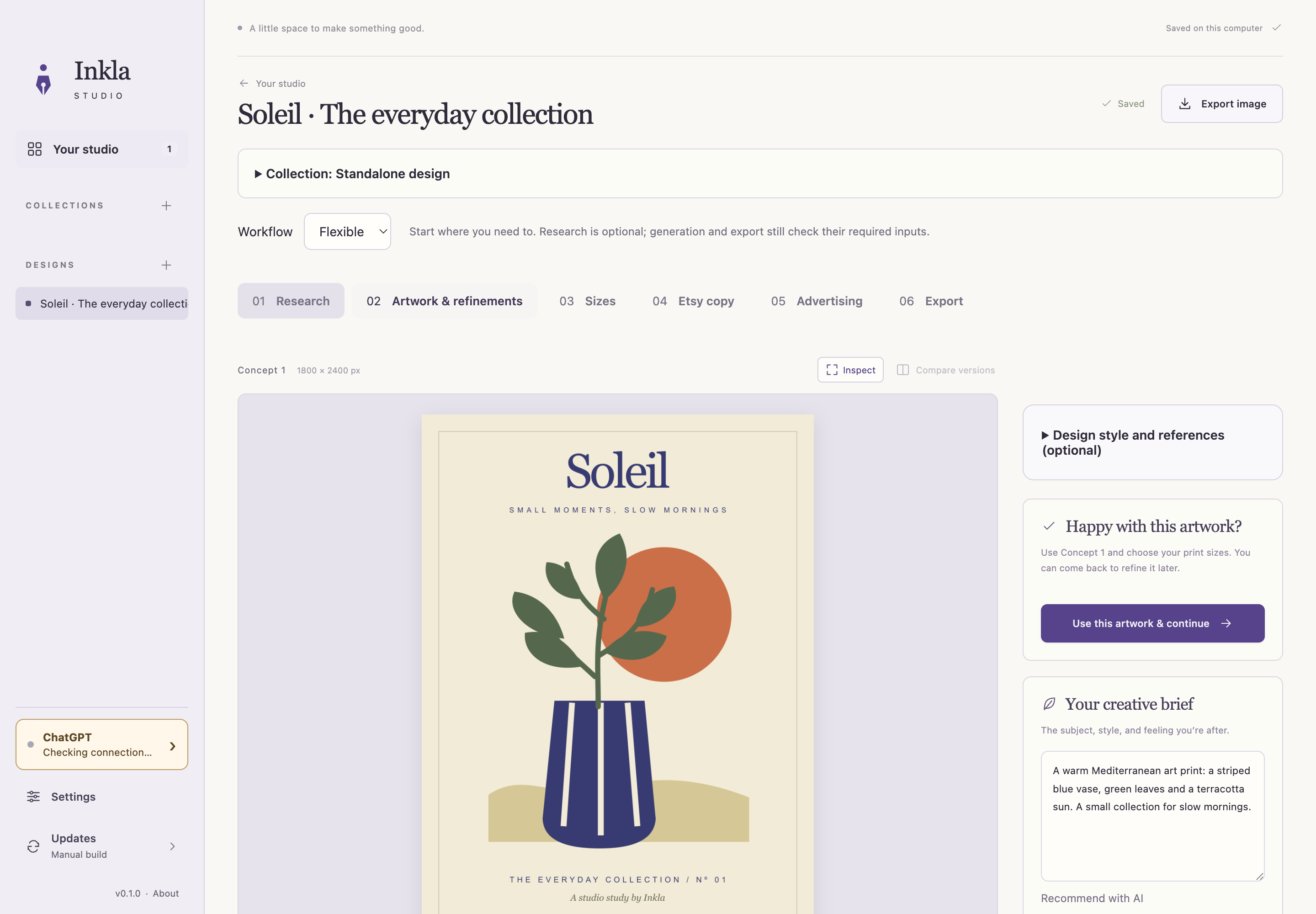
Your artwork, files and listing copy, all in one place.
Create & refine
Start with an idea or existing artwork. Keep the original and compare versions as you make changes.
Prepare & review
Choose print sizes, upscale on your computer and review your files, copy and gallery images.
Export & list
Export your files, then upload them to your shop. Automatic Etsy publishing is not included.
Inkla Studio with an example project. Artwork generated with a connected ChatGPT account.
INKLA STUDIO LITE
Your artwork. Your listing package.
Create and refine artwork, prepare print files, and put your listing images and copy together in one desktop workspace.
Use your own compatible ChatGPT account for AI work. AI access and usage are separate; Lite includes no AI credits.
Mac with Apple silicon or Windows x64
Your own compatible ChatGPT account, with separate access and usage limits
Monthly billing. Cancel through your account.
You can create your account on your phone. To download and use Inkla Studio, sign in on your Mac or Windows computer.
Studio Lite
MAC & WINDOWS
£9/ month
GBP, including applicable tax. Billed monthly. No free trial.
✓Artwork creation and refinements with your ChatGPT account
✓Print preparation and upscaling on your computer
✓Listing copy, gallery images and buyer packages
✓Original artwork and revision history saved locally
Requires a separate compatible ChatGPT account. Its model access and usage limits apply. No AI credits are included. Cancel through your account; access continues until your paid period ends.
Create your account, subscribe, then download Inkla Studio on your computer. Creating an account alone does not start billing. Your selected monthly price includes applicable tax. There is no free trial.
What happens if I cancel?
Cancel through your account at any time. Access continues until your paid period ends. You can still open and export existing projects after that. An active subscription or complimentary access is required to create or edit.
Already have a complimentary invitation?
Accept the invitation in your email for access without a card or automatic billing. Your account shows how long it lasts. Subscribing during complimentary access starts payment immediately.